Introducing Step Farm and Field Module: Two New Wear OS Watch Faces
Two new watch faces join the LinkT collection today, and they could hardly be more different. Step Farm is a cozy pixel art farm that grows as you walk. Field Module is an industrial instrument panel with an LCD clock and glowing indicator lights. Both are available now on Google Play for compatible Wear OS watches.
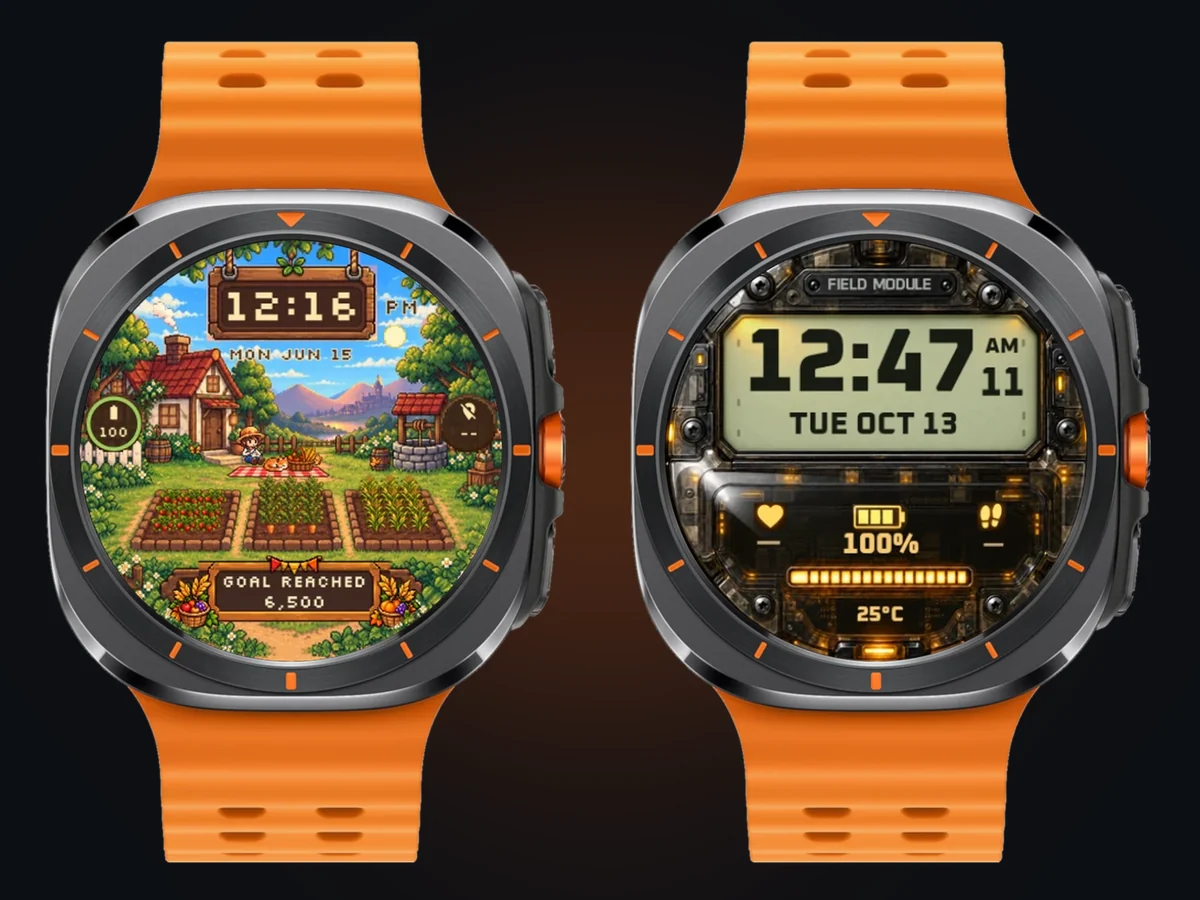
Step Farm: a pixel art farm that grows with your steps
Step Farm puts a small farm on your wrist. Three plots of crops grow from seedling to ripe as you move toward your daily step goal, so a glance at the time also shows how your day is going.
Choose your farm, companion and livestock
Pick one of three settings: Woodland cottage, Stone homestead or Glass greenhouse. Each farm follows the day from dawn to daytime, dusk and night.
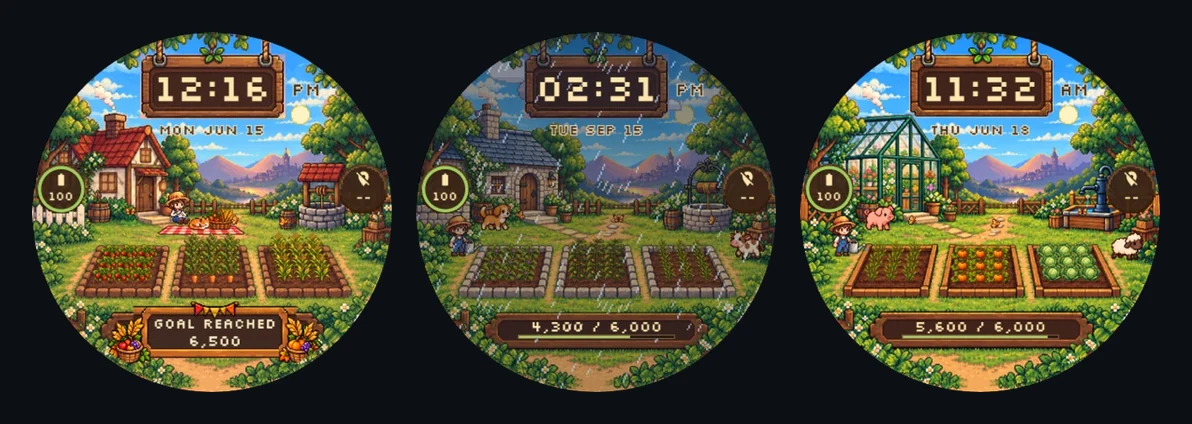
Then add your companions. Choose a cat, dog, pig or rabbit, plus a chicken, cow or sheep. With three farms, four companions and three livestock choices, you can set up a scene that feels like your own.
Twelve crops and a harvest celebration
The three plots draw a daily mix from 12 crops and flowers: carrot, tomato, wheat, corn, pumpkin, eggplant, strawberry, cabbage, sunflower, tulip, daisy and lavender. The date chooses the mix, so the field changes from day to day. Each variety has seedling, growing and ripe stages.
While your goal is incomplete, the watch face shows your step count, goal and progress. Reach the goal and the farm celebrates the harvest with your actual step count.
Everyday details
- Digital time and date, with 12- and 24-hour formats
- A simplified always-on display that keeps time and date visible
- Optional weather effects and seasonal touches
- Two customizable badge complications
Step Farm is a watch face, not a full farming game. It turns your daily activity into a calm scene you will want to check.
Field Module: an industrial instrument panel for your wrist
Field Module takes a very different path. A monochrome LCD-style time display sits above a translucent panel, with diffused indicator lights and a 16-chamber illuminated progress rail. Industrial textures and bolted details make the watch face look like a piece of field equipment.
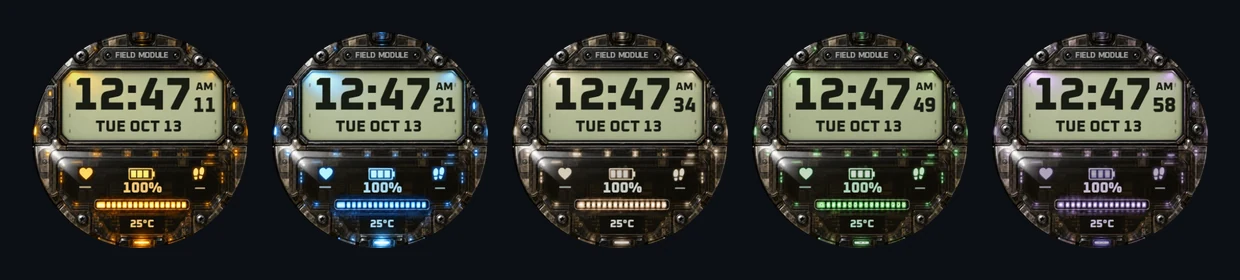
Five light colors, or lights off
Choose Warm amber, Ice blue, Pearl white, Sage green or Gray violet lighting. If you prefer a quieter look, you can switch the indicator lights off.
Data where you want it
- Set the left, center and right data windows independently to battery level, steps or heart rate.
- Use the progress rail for your system step-goal progress or battery level.
- Add a compatible provider to the bottom complication slot, such as temperature when your watch offers it.
In always-on mode, the time stays aligned with the active layout and a faint outline of the panel remains. Field Module does not include its own weather service, and heart rate is for general information, not medical use.
Which new watch face is right for you?
Choose Step Farm if you like pixel art, gentle animation and a step counter that feels rewarding. It suits anyone who enjoyed Step Quest but wants a calmer scene than a monster battle.
Choose Field Module if you prefer a clean, data-forward dial with a mechanical character. It sits alongside STEEL 316 and Wear GT as one of the collection’s instrument-style faces.
For a wider comparison of pixel worlds, nature scenes and industrial dials, read our 2026 watch face guide.
Price and compatibility
Both watch faces are $1.99 on Google Play in the United States at the time of writing. Prices can vary by region and may change, so check the listing for your current price.
- Step Farm requires a compatible Wear OS watch with Watch Face Format v2 support.
- Field Module requires a Wear OS 5 or later watch with Watch Face Format 2 support.
Neither works with Tizen or Apple Watch. Step and heart rate data, weather and complications depend on your watch, its permissions and the providers you select.
How to install
- Open the Google Play listing for Step Farm or Field Module.
- Install the watch face on your compatible watch. A phone app helps with installation, but it is not the watch face itself.
- Long-press your current watch face, find the new one in the picker and select it.
- Open the customization options to choose your farm, companions, light color or data windows.
Need more help? Follow the installation guide and check watch compatibility.
Frequently asked questions
Do the crops in Step Farm grow with my steps?
Yes. The three plots move from seedling to growing to ripe as you approach your daily step goal. Your watch supplies the step and goal data.
Can I choose which crops appear?
No. A date-based mix chooses three varieties from 12 crops and flowers each day. You choose the farm setting, companion and livestock.
Can I set a custom step goal in Field Module?
No. The progress rail uses your watch’s system step goal. You can also switch the rail to show battery level.
Will these watch faces work on my watch?
Both need Watch Face Format v2 support, and Field Module also needs Wear OS 5 or later. Check your watch’s software version and our compatibility page before buying.