Wear GT
An animated driving cockpit for your wrist
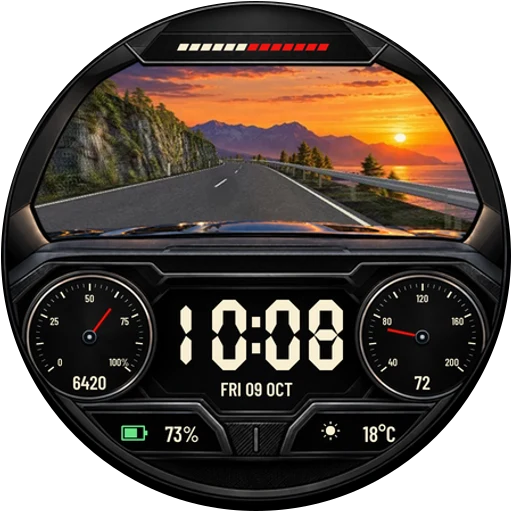
Actual artwork · Still preview
Get a Google Play code
Checking availability…
Your code · Saved in this browser
Cannot be redeemed on Google Play.
How to redeem & install
- Copy your code. In Google Play, open Payments & subscriptions → Redeem code.
- Confirm that it names Wear GT before redeeming.
- Use the same Google account on your compatible watch and install from the listing.
Google Play confirms validity. Issued does not mean redeemed.
Dates, compatibility & claiming details
Synthetic test codes only; no product entitlement is granted. Check your watch’s compatibility and current regional price on Google Play. Codes depend on Google Play eligibility and region.
No account, sharing or review required. One assignment per browser in this campaign. A secure cookie lets this browser find its code again for up to one year; clearing cookies or changing devices prevents recovery and cannot guarantee one code per person.
IP rate limits use rotating short-term hashes. We count visits, code issuance and link clicks, with Reddit or direct source; we cannot see redemption or purchases. Security uses Cloudflare Turnstile. Issued codes are never recycled.
Features & watch compatibility
Wear GT puts a scenic drive above your digital clock. Choose Coast Dusk, Neon Night, Beach Day or Canyon Sunset, then pair it with one of five dashboard finishes.
Make the cockpit yours
- Configure the two dials independently, with options including steps, heart rate, battery and a small clock.
- Add compatible complications to the two lower information slots.
- Switch the rain effect and driving animation on or off.
Follow your daily destination
Your watch’s steps and step goal drive destination progress. Always drive keeps the journey moving instead. Rain is a manual visual effect. The always-on display keeps time and date visible without the animated scenery.
Requires Wear OS 5 or later. Readings and progress depend on the data providers available on your watch.